🎉 Up to 44% off all plans · from $8.08/month · 7-day free trial

Real speaking practice, built on your curriculum.

Teacher AI gives your students a conversation partner that practices what you actually teach, in your voice or your teachers' voices, for all the hours you are not in the room. How it works depends on your setup, so start here.

Which one are you?

For creators and course owners

Add speaking practice to your course. Free.

Your students practice speaking with an AI clone of you, inside the course you already sell. One iframe per lesson, in your voice, on your material.

Free for you · Free for your students · Works on Teachable, Circle, Thinkific & more
For language schools and universities

More speaking practice. Without more teacher hours.

Your teachers are the reason students choose you. Teacher AI gives every student a patient practice partner in your teachers' voices, trained on your own curriculum, for all the hours between lessons. Class time goes back to the things only a person can do, and for the first time you can see what happens between lessons.

Your curriculum, your teachers' voices · Web, iOS and Android · Optional white-label app
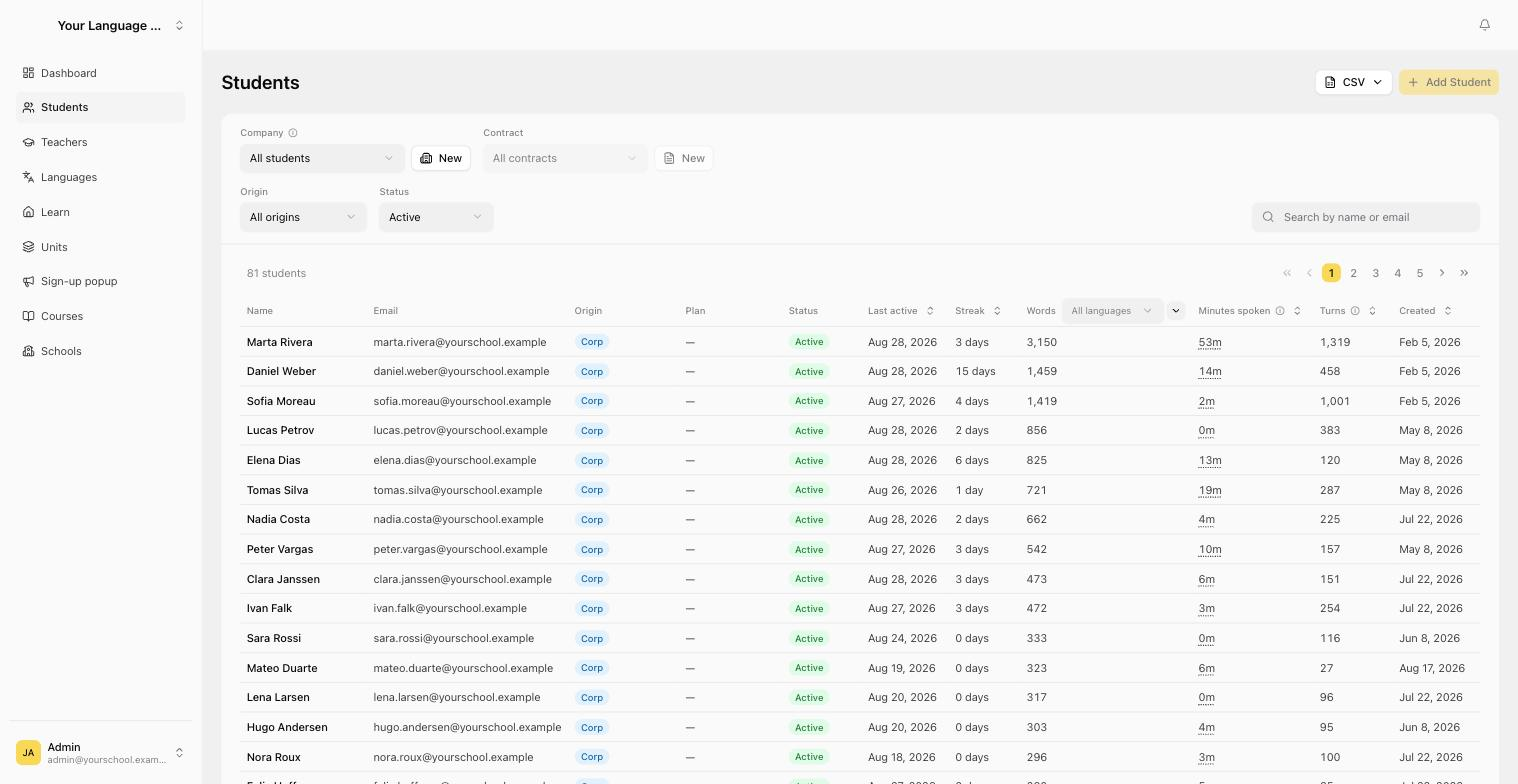
Student overview showing words produced, minutes spoken, turns and streaks per student
Live example

This is what an iframe looks like

Add speaking practice directly to your course, for free. You embed Teacher AI speaking practice right inside your course platform with one iframe: the same few lines of HTML you already use for a YouTube video. The one below is real. Tap it and speak.

An English speaking exercise. You can add this one to your course as it is, and you write your own prompts and exercises too, one per module, in your own voice.

<iframe
  src="https://app.yourteacher.ai/chat-guest/6f3c13b1-38db-4b17-8b30-b7c2b6e7f2f4"
  width="100%"
  height="600"
  allow="microphone; autoplay; fullscreen; clipboard-write"
  allowfullscreen
  style="border: none; border-radius: 4px;"
></iframe>

Paste that into any lesson in Teachable, Circle, Thinkific, Kajabi or anything else that takes an HTML embed. We send you one snippet per module.

Already on board

Creators using this today

Your studio

Your own dashboard, your own AI clone

Apply and you get a studio of your own. Free for you and free for your students. This is what is inside it.

A clone in your voice

Same voice, same style, same way of explaining things. It carries your bio and the languages you teach, so your students recognize you.

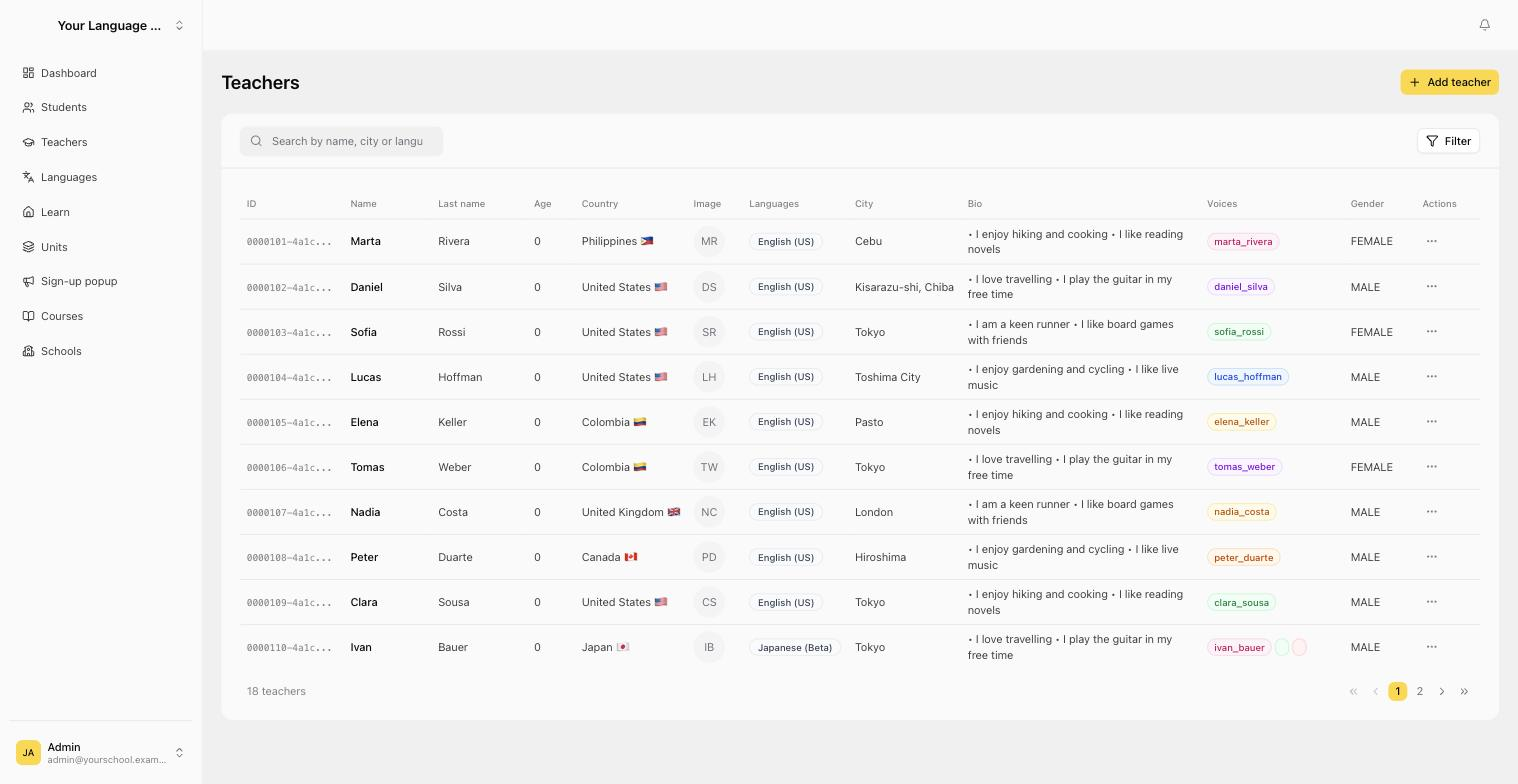
The Teachers page of the dashboard, listing each clone with its languages, bio and voice

A lesson for every module

Write what the exercise should practice, copy the iframe, paste it under the lesson it belongs to. As many as you teach, grouped the way your course is.

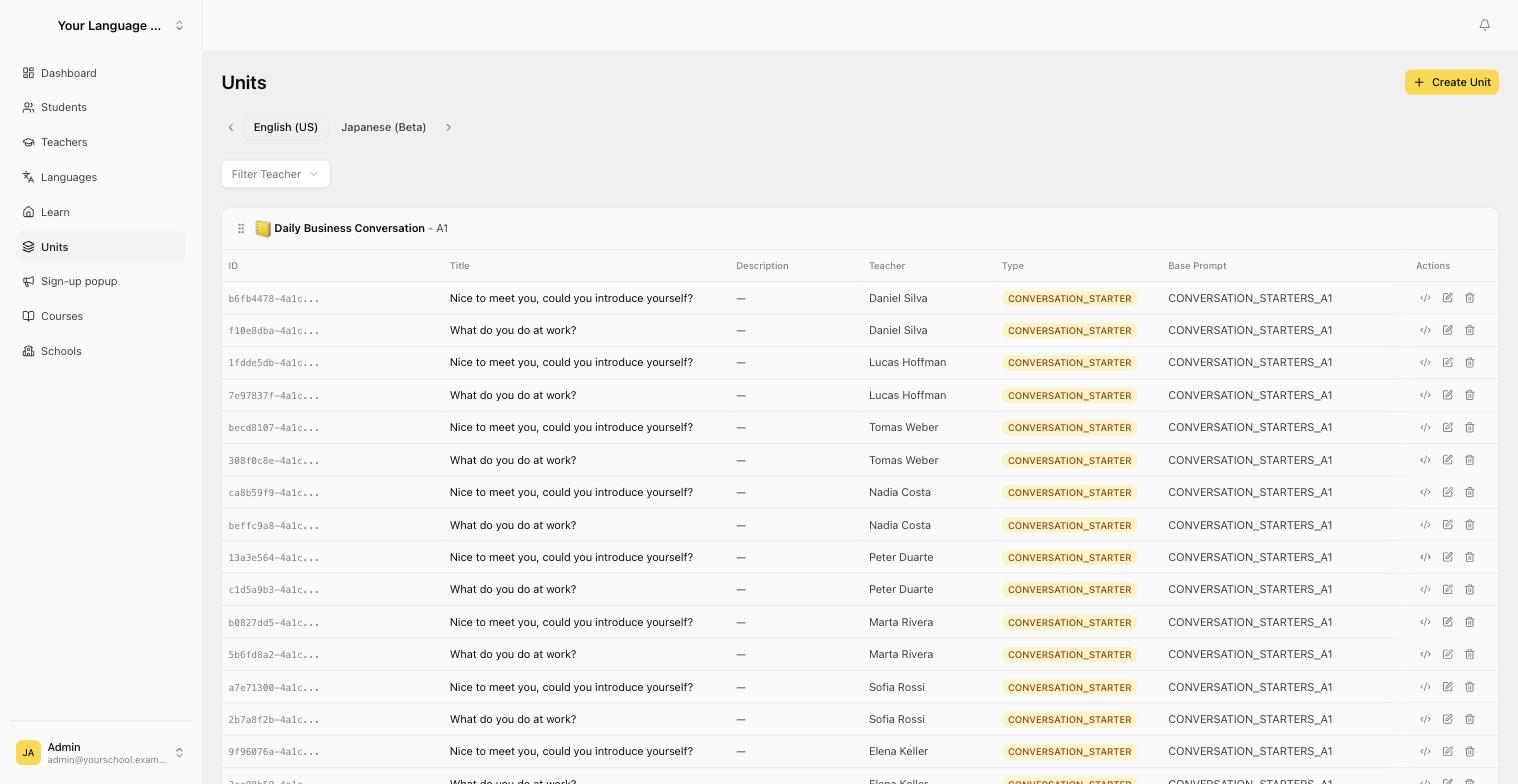
The Units page, showing lessons grouped by unit with the teacher and prompt behind each one

A dashboard of your own

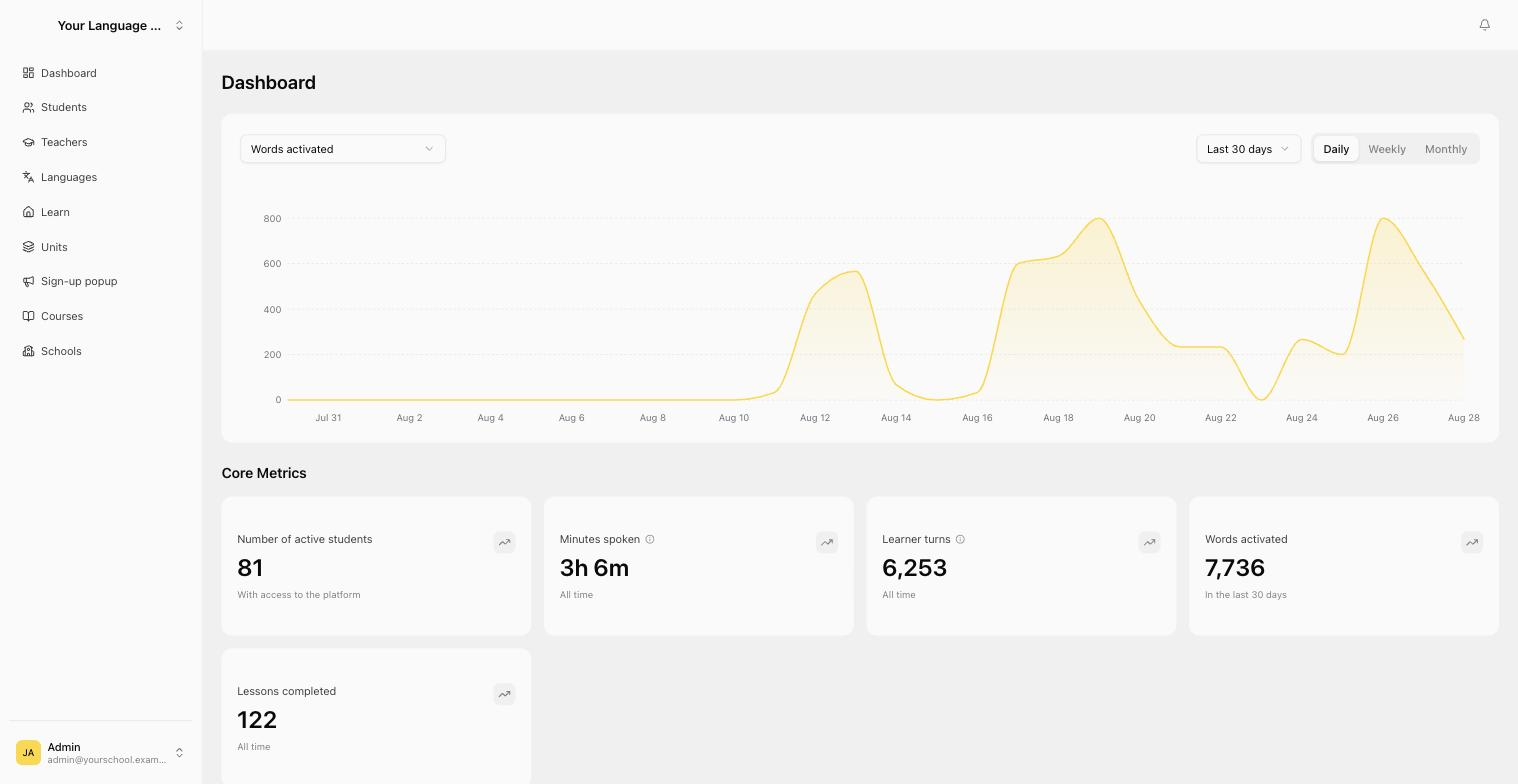
Minutes spoken, learner turns, words activated, lessons completed. Who practiced, how long they spoke, and where they got stuck.

The dashboard, showing words activated over the last 30 days with active students, minutes spoken, learner turns and lessons completed

Screens from a demo account. Your studio opens with your own clone and nothing else in it.

And when a student wants to keep talking beyond their free practice, they subscribe through you and you earn a commission on it.

Apply for a studio →

Your name, your email, and a line about what you teach. Confirm the address and we read it ourselves; your login follows once it is approved.

How it works

The practice happens
between your lessons.

You keep teaching the way you teach. We take your material and turn each unit into a spoken exercise your students can do on their own, as many times as they want, in the voice of the teacher who taught it.

1

Upload your own curriculum

Add your units and lessons in your own dashboard, organized by course, level and language. Speaking exercises are built around them, and you generate the embed codes yourself whenever you need one.

2

Students practice on their own

They open it in a browser, or in your own app, and speak. Corrections come back in the moment, the way a good teacher gives them.

3

You see who is putting in the hours

A student overview shows who practiced, how much language they produced and how engaged they are, per class and per period. Work outside the classroom finally becomes measurable.

Getting started

One step. Get in touch.

Tell us what you teach, how many students you have and where your lessons live today. We get on a call, walk you through the platform, and show you what your own curriculum would look like inside it, with or without your own brand on top. If it fits, we build it. If it does not, we will say so.

Custom plans

Run your whole school
from one dashboard.

Your teachers, your curriculum, your students, all in one place. Upload and own your own lessons, clone the teachers who teach them, and see exactly what every student does between lessons. Optionally under your own brand, on your own domain, so your students never see ours.

Teachers

Your teachers. Their voices.

Add every teacher who teaches at your school and we clone their voice. A student practicing unit 4 hears the teacher who taught unit 4, in the language they teach, with the same manner they use in class.

  • One cloned voice per teacher, in your own account
  • Assign a teacher to any unit or lesson
  • Add or remove a teacher at any time
  • A few minutes of sample audio is all we need
admin.yourteacher.ai/teachers
Admin view: your teachers, their languages and their cloned voices
Students

Manage students and access

Add students in seconds or import a whole cohort by CSV, then grant or revoke access whenever you need to. Filter by company, contract, or status so you always know who is active.

  • Add students one by one or bulk import by CSV
  • Grant or revoke access at any time
  • Unlimited teacher accounts, included
  • Filter by company, contract, and status
  • See who is active at a glance
admin.yourteacher.ai/students
Admin view: students, access, words produced, minutes spoken and streaks
Lessons and units

Upload and own your lessons

Upload your own lessons and units, organize them by course, level, and language, and assign a teacher to each one. Your curriculum stays yours.

  • Upload your own lessons and units
  • Organize by course, level, and language
  • Assign a teacher to every lesson
  • Your content, owned by you
admin.yourteacher.ai/units
Admin view: your own units and lessons, by course, level and teacher
Practice

Students practice on their own

They open it in a browser, or in the Teacher AI app on iOS and Android, and speak. The AI keeps the conversation going, corrects them in the moment, and lets them tap any word for a translation. Progress follows them between devices.

  • Web app, iOS and Android. Your students pick.
  • Soft corrections in the flow, full breakdowns on demand
  • Tap any word for a translation in context
  • Nothing to install if they would rather stay in the browser
app.yourteacher.ai
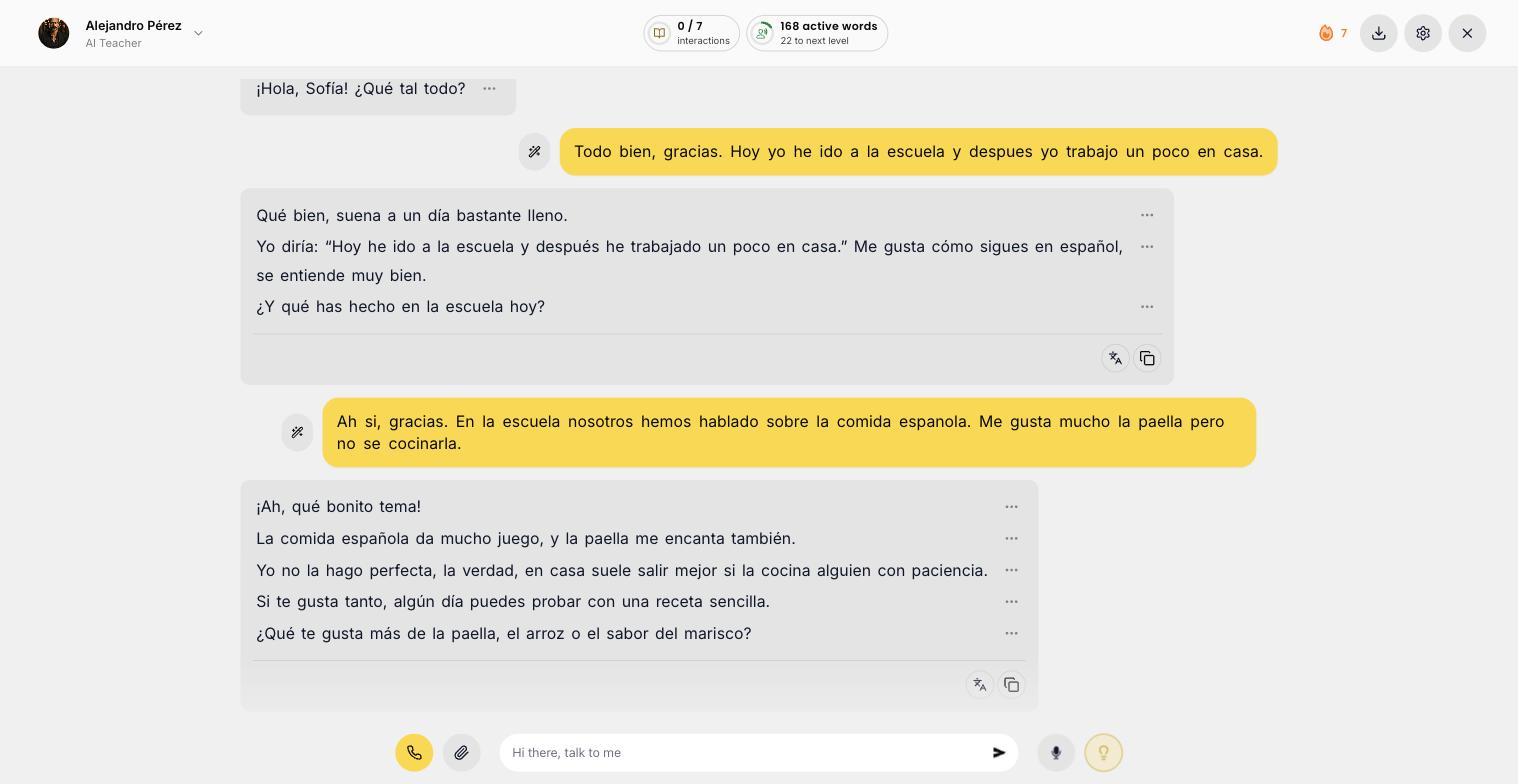
A student practicing a spoken conversation with their AI teacher
Analytics

Track usage and progress

A live dashboard shows words activated, active students, engagement, session time, and more. See what is working and prove the results to your stakeholders.

  • Words activated, active students, and engagement rate
  • Average session time and total platform usage
  • Daily, weekly, and monthly views
  • Compare every metric against the previous period
app.yourteacher.ai/dashboard
Dashboard: words activated over time, active students, learner turns and lessons completed
White-label

Your own app. Your brand. If you want it.

Optional, never a requirement. Most schools start on the standard Teacher AI app and are happy there. When you do want it, we deliver a fully white-label app and platform under your own brand, logo and domain, so your students practice inside your brand and never see Teacher AI. Usually a fit from around 200 students upward.

Book a platform demo →

Custom pricing based on your size. We'll scope it with you on the call.
Rather write it up first? Send us your details.

Pricing

From $15 per student, per month.

The rate depends on your size. It starts at $15 per student per month from 100 students, and comes down at 500 students and again at 1,000. No setup fee, no annual contract to sign before you have seen it work, and teacher accounts are unlimited and included. We work out your exact number on the call.

100 students
From $15
per student, per month
500 students
Volume rate
the price comes down
1,000+ students
Best rate
our lowest per-student price

Setup is included. Send us your curriculum and we build the speaking exercises around it.

Questions?

Creator FAQ

Schools and universities FAQ

How does Teacher AI know what to teach in each lesson?

You upload your course materials, and the speaking exercises are generated from your content, one per module, matched to what you're teaching. No prompt-writing on your part, no AI training to wrangle. We handle the setup end to end.

How does it know what to practice?

You send us your curriculum: your units, your levels, your materials. We build a speaking exercise around each one, so a student practices the language your teacher just covered, not something generic. Nobody on your team writes a prompt or configures an AI.

How much can each student use it, per module?

On the free embed, one full speaking exercise per module. A real practice session on the topic of that module. (Technically up to 7 conversational turns, which is enough to actually use what you just taught.) Students who want to keep going can sign up for unlimited access, or you can license unlimited access for everyone.

What if my students are already Teacher AI subscribers?

They can log in during the embedded session and the per-module guest cap disappears, so they get unlimited speaking practice on your course content. Existing subscribers get the best of both worlds: your structured course plus unlimited conversation.

How does the pricing work? Do we pay you?

On the free plan, the integration costs you nothing and the embeds stay free. We earn from the students who choose to sign up for unlimited Teacher AI access after their free per-module exercise, and you earn affiliate commission on every one of them, so the free plan can pay you rather than cost you.

On the license, you pay $15 per student, per month. In exchange your students get unlimited use, never see an upsell prompt, and you get the dashboard, your own uploaded lessons and analytics. If you have a lot of students, get in touch and we'll work it out together.

How does the pricing work?

Per student, per month, starting at $15 from 100 students. The rate comes down at 500 students and again at 1,000, because a school of 100 and a school of 3,000 should not be quoted the same way. Teacher accounts are unlimited and included at every size, and there is no setup fee.

Teacher accounts are unlimited and included. We can invoice against a purchase order and bill annually if that suits your finance team better.

Are you going to sell to our students?

Fair question, and worth being straight about. On the free plan, a student who finishes their exercise and wants to keep talking sees a soft prompt to sign up for unlimited Teacher AI. It appears once the exercise has wrapped up, never mid-lesson, and it is never a paywall on the practice you're giving them.

Two things make that work in your favour rather than against you. First, you earn affiliate commission on every student who signs up through your embeds, so those signups pay you. Second, they're buying general speaking practice, not a replacement for your course, and they stay in your course either way.

If you'd still rather they never saw it, that is exactly what the paid plan removes. Every enrolled student gets unlimited practice and zero upsell prompts, end to end.

Will our students be advertised to?

No. On the full platform there are no upsell prompts of any kind. Your students never see an offer, a price, or a sign-up screen. That is not something we bolt on for schools, it is how the school plan is built.

Does this replace our teachers?

No, and it isn't built to. The AI is a practice partner for the hours your teachers aren't there: the repetition, the drilling, the low-stakes speaking a learner needs far more of than any timetable can hold. It practices your curriculum, in your teachers' voices, on what you already taught.

The point is to change what class time is for. When students arrive having already used the material out loud, your teachers can spend less of the lesson on mechanical repetition and more on the things only a person can do.

Do students need accounts, or an app?

No app. It runs in the browser your students already have, on a school laptop, a Chromebook or their own phone, so there is nothing for IT to roll out or approve. On the full platform each student gets an account so their progress is saved and their teacher can see their usage. You can import a whole class by CSV and revoke access at any time.

Does it work for absolute beginners?

Yes. Exercises are built at the level you teach, so a first-year class practices first-year language. A beginner is not dropped into open conversation, they are walked through the sentences they just learned until they can produce them without help.

Can we manage our own students, access, and lessons?

Yes, on a paid plan. You get a full dashboard where you add students or import a whole cohort by CSV, grant or revoke access at any time, and upload and organize your own lessons and units. You also get a live analytics view: words activated, active students, engagement, and session time.

Can we get our own white-label app and platform?

Yes. On a custom plan we can deliver a fully white-label app and platform under your own brand, logo, and domain. Your students practice inside your brand and never see Teacher AI. Get in touch and we'll scope it with you.

Is there a login at all? Will students get redirected away from my course?

Not on the free embed. Students click into the iframe and start speaking immediately as a guest, no login and no redirect. If they want more practice beyond their free per-module exercise, they see a soft prompt to sign up for unlimited access. They are never forced to leave your course.

What platforms do you support?

Anything that accepts an iframe embed: Teachable, Circle, Thinkific, Kajabi, Hotmart, Mighty Networks, Podia, LearnWorlds, and custom-built course sites. If you're not sure, send us a link and we'll confirm.

How long does setup take?

Once you apply and give us access to your material, most setups land within 5–7 business days. The time depends mostly on how many units need custom exercises.

Can my students practice with my voice?

Yes. That's the standard setup. We clone your voice and teaching style so students practice with you, in your voice. If your course has multiple teachers, we clone each one. All we need is a few minutes of sample audio of each teacher speaking the target language (a clip from your YouTube channel, a recording, anything you can send).

Can students practice with our own teachers' voices?

Yes, and it is the setup we recommend. We clone each of your teachers so a student hears someone they recognize from class. All we need is a few minutes of sample audio per teacher speaking the target language. Teachers give consent before we clone them, and we remove a clone whenever you ask.

What about data privacy?

All voice and conversation data is handled under our Privacy Policy. We don't sell student data and we never share it with third parties beyond the service providers needed to make speech-to-text work.

Who controls our students' data?

You do. We sign the data processing agreement and the EU standard contractual clauses. Your school stays the controller, we process on your instructions, and it is all on paper before the first student account exists.

  • A data processing agreement, signed at the start.
  • EU standard contractual clauses for the transfer.
  • A written list of every provider that touches student data.
  • Students keep their GDPR rights: access, export and deletion.

Everything else is covered by our Privacy Policy. Bring your data protection officer to the call and we will walk them through what is stored, where, and for how long.

What languages do you support?

60+ languages: Italian, French, Spanish, German, Mandarin, Portuguese, Russian, Dutch, Norwegian, Turkish, and dozens more. Full list available on the main page.
Try it on your own course

Apply for a studio. Tell us what you teach, confirm your email, and we set you up with your clone and your first lesson.

Apply for a studio →

Want this for your school?

Book a short call. Tell us what you teach and how many students you have, and we'll show you exactly what it would look like on your own curriculum.

Book a call →